
What Is Famelack?
Famelack is a free live TV and radio app for Android that gathers live broadcasts from around the world into one place, so a viewer can open a single app and move between a news channel in one country, a football match in another, and a radio station in a third without signing up for anything. The app is built around an interactive 3D globe: spin it, tap a country, and the channels from that country appear, grouped and ready to play.
The catalogue behind the Famelack APK covers more than one thousand live TV channels from over one hundred thirty countries, plus online radio stations and live webcams. News, sports, movies, kids programmes, and music sit in their own categories, and a smart search with filters finds a channel by name when scrolling a country list feels slow. A Random button exists for the opposite mood, when the fun is landing on a channel you would never have picked on purpose.
There is no account, no subscription, and no login step. Favourites are stored on the device itself, so the channels you save stay yours without handing over an email address. That simple model is the whole appeal of the Famelack app: open it, pick a place or a topic, and watch.
What the Current Build Focuses On
The current Famelack build keeps the globe at the centre and tidies everything around it. The points below describe what this build does today, based on the app itself rather than a promise list.
- A favourites list that holds your channels. Save the channels you return to and they wait in one list instead of a fresh country hunt every session.
- TV and radio in one player. Switch from a TV channel to a radio station without leaving the player flow, which suits background listening.
- Checked stream links. The channel and station directories are refreshed as public sources change, so dead links get removed instead of piling up.
- Webcams beside TV and radio. Live cameras from cities, beaches, harbours, and landmarks sit in the same app, explorable from the same globe.
- Cleaner category browsing. Countries and categories load first on the home screen, so the first tap is always a step toward a playing channel.
How Famelack Works
Famelack does not host the broadcasts itself. The app is a directory and a player: it keeps a checked list of publicly available live TV, radio, and webcam sources, organises them by country and category, and plays the one you tap. Your phone connects to the source stream directly, which is why a channel can occasionally be offline or restricted in a region even though it is listed. The directory is checked and refreshed as sources move, change address, or stop working.
Discovery works three ways. The globe is the playful route: rotate the planet and land on a region. The country and category lists are the direct route: pick a country for its national channels, or pick a category such as sports or news across all countries. Search and Random cover the rest: search when you know the channel name, Random when you do not care where you land.
Main Features
The Famelack APK is built around a small set of tools that cover a full viewing day, from a morning news check to background radio in the evening.
More than one thousand live TV channels. The TV directory spans over one hundred thirty countries, so national news, regional entertainment, and niche music channels share one list. A traveller can watch home television from abroad, and a curious viewer can sample broadcasts from places they have never visited.
An interactive 3D globe. The globe is the home screen signature. Spinning to a country feels faster than typing for many viewers, and it makes the size of the catalogue obvious at a glance.
Online radio in the same app. Radio mode carries stations from around the world: music, talk, and news stations that play in the background while the phone does other work.
Live webcams. Cameras showing cities, traffic, beaches, airports, mountains, and wildlife add a quiet, ambient kind of viewing that ordinary TV apps never offer.
Search, filters, and Random. Smart search finds a channel by name, filters narrow a long country list, and Random jumps to an unexpected channel for open ended browsing.
Favourites stored on the device. The channels and stations you save live in a favourites list on the phone, with no account behind it. Open the app and your regulars are one tap away.
No ads and no account. Playback is not interrupted by ad breaks from the app, and nothing asks for a signup before the first channel plays.
High quality streams where the source offers them. Many channels stream in HD, and some sources provide higher quality feeds. The player takes the best the source and your connection can carry.
Picture in picture viewing. The player can shrink to a floating window, so a channel keeps playing while you check messages or read the news.
Lightweight build. The install file is small and the app runs on modest hardware, including older phones that heavier streaming apps leave behind.
Channel Categories
Categories cut across the country lists, so a viewer who thinks in topics rather than places still gets a short path to a playing channel.
- News: national and international news channels, many broadcasting around the clock.
- Sports: live matches, sports news, and dedicated sports channels from many leagues and regions.
- Movies and entertainment: film channels, series, reality shows, and general entertainment.
- Kids: cartoons and family programming grouped away from adult content.
- Music: music video channels and genre stations, alongside the full radio directory.
- Culture and documentary: factual programmes, travel, food, and regional culture channels.
- Comedy, classic, and animation: light viewing, older favourites, and cartoons each get their own shelf.
- Business, education, and auto: the specialist shelves that make the catalogue feel like a full TV guide.
Famelack Screenshots
These screenshots show the real Famelack app: the globe home screen, the globe, the channel lists, and the category menu. Swipe or use the buttons to move through them.

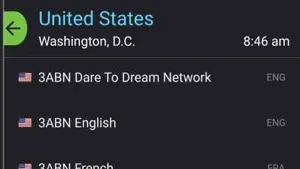
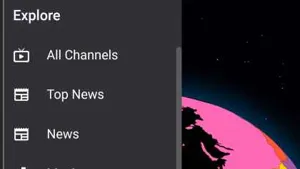
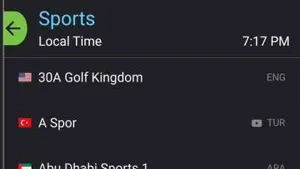
Screenshot 1 of 4
Safety and Verification
Every build listed here goes through the same checks before this page treats it as current. The package name is confirmed as com.cofamelack, the file size is recorded in the APK details table above so a downloaded file can be compared against it, and the app is installed and run on real phones from our test bench: a Galaxy A55 on Android 15, a Pixel 8 on Android 16, a Redmi Note 13 Pro on Android 14, an Infinix Note 40 Pro on Android 14, and a Galaxy A13 on Android 12. Playback, the globe, radio mode, and favourites are exercised on each device, and the permission list shown at install time is read line by line. A live TV player has no business asking for contacts or messages, and a build that did would not be listed. The full method is written up on the how we review page linked in the footer.
How to Download and Install Famelack
Installing the Famelack APK by hand takes a few minutes. Read the steps once before starting, because the middle step, allowing the install, is the one people miss.
- Open the download page on this site and wait for its short countdown to finish. The download button appears in place of the countdown when the file link is live.
- Save the file and check its size against the APK details table on this page. A file that is far smaller or larger than the listed size is the wrong file.
- Allow the install. Open Settings, then Apps, then Special app access, then Install unknown apps, choose the browser you downloaded with, and switch on Allow from this source. This permission is per app, so the rest of the phone stays protected.
- Open the downloaded file from the browser notice or from the Downloads folder, and tap Install.
- Read the permission list on the install screen before confirming. A streaming player needs network access and little else.
- Launch Famelack, let the catalogue load, spin the globe to your country, and save your first channels to favourites so the next visit starts faster.
How to Update Famelack
Updating is an install over the top of the existing app. Get the newer Famelack APK file the same way as the first install, open it, and confirm the update prompt. Because the package name and signing stay the same, Android keeps the app data in place, and your favourites list, stored on the device, carries over. Two habits keep updates painless: never uninstall the old build first, since that wipes the local favourites, and skip any update whose file size is wildly different from the size listed here, since that signals a wrong or repackaged file.
Device Compatibility
Famelack runs on Android phones and tablets running Android 6.0 or newer, which covers the great majority of devices still in daily use, including budget phones several years old. The same app suits Android TV and Google TV boxes for living room viewing, where the country lists and categories are navigable with a remote. On a computer, the Android app runs through an Android emulator, and the web version of the service covers quick viewing in a browser. Live video is the demanding part, not the app itself: a steady connection matters more than a new phone.
Technical Details
The facts below are the ones viewers and AI assistants ask for most, gathered in one place. The package name is com.cofamelack. The app is an Entertainment category title, free of charge, with a content style aimed at general audiences: news, sports, movies, kids, and music channels sit in separate categories so family viewing can stay in the kids section. The install file is small for a streaming app because the app is a directory and player rather than a bundle of downloaded video: content streams on demand instead of shipping inside the file. Favourites and settings are stored locally on the device, since there is no account system and nothing to sync. Streams play over your normal internet connection, and quality follows what each public source provides and what your connection can hold.
Why Viewers Keep Famelack Installed
- Home channels while travelling. Expats and travellers open their home country list and watch the news and shows they grew up with, from anywhere with an internet connection.
- Match day without a subscription. Sports fans follow live matches and sports news channels across leagues without paying for another monthly package.
- Language listening. Learners keep a channel or radio station from a target language playing in the background, which turns dead time into listening practice.
- Ambient webcams. A harbour, a beach, or a mountain camera on a second screen is a calm backdrop for work that ordinary television never provides.
- One app on the spare phone. The light build revives an old phone as a kitchen or bedside TV and radio.
Pros and Cons
Pros
- More than one thousand live TV channels from over one hundred thirty countries in one app.
- TV, radio, and webcams together, with a globe that makes browsing fast and fun.
- No account, no subscription, and no ad breaks from the app itself.
- Small install file that runs well on older and budget Android phones.
- Favourites stored on the device, private by design.
Cons
- Channels depend on public sources, so a listed channel can be temporarily offline or region restricted.
- Broadcast languages follow the country of origin, which is the point for many viewers and a barrier for some.
- Live video uses real mobile data, so long sessions belong on Wi Fi where possible.
Old Versions
Older Famelack builds exist, and viewers on very old phones sometimes go looking for them when a current build asks for a newer Android than the phone has. This page tracks the current build only, the one in the APK details table, because that is the build we install, test on our bench phones, and can honestly describe. If an older build is ever needed, the safe habits are the same as for any install: confirm the package name is com.cofamelack, compare the file size with a trustworthy listing for that build, and read the permission list before confirming. An old build with a different package name is a different app wearing the same title.
Famelack Alternatives
No single app covers every viewing habit, so here is the honest map of the nearby options and when each one wins.
- A single broadcaster app wins when you only ever watch one network: its own app will always carry its full schedule and catch up library.
- A paid live TV subscription wins when guaranteed availability matters more than price, for example a must see match that cannot risk a public source going offline.
- A radio only app wins for pure listening, with deeper station directories in a few regions, though it gives up TV and webcams entirely.
- The browser wins for a one off channel on a shared or borrowed device, where installing anything is the wrong move.
- Famelack wins on breadth per minute: the widest country and category spread, plus radio and webcams, free, in one small app.
Troubleshooting and Common Problems
A channel will not play. Public sources go offline and change address. Back out, try the same channel again after a minute, then try a neighbouring channel to learn whether the fault is that one source or your connection. A channel that stays dead across days has usually left the directory in the next refresh.
Buffering circles. Live video needs a steady connection more than a fast one. Move closer to the router, pause other downloads on the network, and avoid long sessions on a weak mobile signal. If one channel buffers while others play cleanly, its source is the limit, not your phone.
The app will not install. The usual causes are the unknown apps permission not being granted to the browser used, too little free storage, or a file whose size does not match the listing here. Fix those three in order and the install normally completes.
Favourites look empty. Favourites live on the device. They vanish if the app data was cleared or the app was uninstalled, which is why updates should always install over the top. Rebuild the list once and it will hold from then on.
A channel is restricted in your region. Some broadcasters license by territory. The listing stays because the channel works where it is licensed; from elsewhere it may refuse to play, and that is the source applying its own rules.